
Your Best AI Coding Guide with Claude Code and Cursor
Learn how to utilize Code Agents the best way possible by utilizing these tips/tricks and techniques! They saved me a ton of time, money and helped me brainstorm problems 10X better than solo

after working for over an year with AI now in my work and on side-projects I can confidently say I the groove it all and how to do your best work with LLMs as your project buddy!
I’ve read, read some more, build, then shipped products and features utilizing AI, following what I am about to tell you in this blog-post.
The aim of this blog-post is to be VERY HIGH VALUE. Everyone should save it for later reference, because you will the advise I am about to give you, you would reduce the cost of developing with LLMs a bunch as well as improve your AI Code Agent experience 10X!
let me jump straight into my findings 👇
The 1st Breakthrough Finding:
research → plan → implement
the single most impactful technique comes directly from Anthropic’s engineering team: forcing a deliberate planning phase before code generation transforms output quality. Without this separation, Claude jumps straight to coding solutions, missing critical context and architectural considerations.
actually devs report this workflow alone improves success rates from roughly 1/3 to 2/3 on complex tasks. The pattern works because it mirrors how senior engineers approach problems - understanding context deeply before touching code.
“Give AI one clearly defined task at a time. Vague or broad instructions produce poor results.” - Carl Rannaberg
the four-step rhythm that emerged across multiple sources:
ask AI to research the problem by exploring your codebase first
have it create a detailed plan with reasoning
only then let it implement with verification steps
finally, have it commit with clear explanations.
this structure prevents the “doom loops” where AI gets stuck making unhelpful iterations.
CLAUDE.md and .cursorrules: Your Most Powerful Tools
Remember the rules file is more important than prompt cleverness.
These special files automatically provide context for every AI interaction, functioning as persistent project memory.
👉 for Claude Code, create a CLAUDE.md file in your project root
👉 For Cursor, use .cursorrules
both follow the same principle: document repository structure, coding conventions, architectural decisions, and project-specific patterns. Anthropic’s internal teams found this made Claude excel at routine tasks - when you have existing patterns documented, AI can replicate them consistently
but what should actually go in these files?
..
before you continue, I have actually built an AI-first platform where you can upskill and prepare yourself as a SWE for upcoming tech interviews or in general, utilizing AI and Reinforcement Learning 🧠
running on Free Trial of 14 days for now, try now, cancel anytime 👇
..
start with ten core lines:
specify your tech stack
warn against common mistakes specific to your project
define code style preferences
list frameworks being used.
then add a technical overview section explaining what the project does, how it works, important files, and core algorithms.
Don’t overthink it - start small, add when AI makes the same mistake twice.
the iterative refinement approach pays dividends. At Anthropic, teams run CLAUDE.md files through prompt improvers occasionally and add emphasis with “IMPORTANT” or “YOU MUST” to improve adherence.
your rules files become part of Claude’s prompts, so they should be refined like any frequently used prompt.
one pro tip: Press the # key in Claude Code to give it an instruction that it will automatically incorporate into the relevant CLAUDE.md
Test-Driven AI Development: The 1000x Improvement
this technique is the one I relate to the most as it has given me the biggest boost in performance when it comes to utilizing LLMs in software building. it’s a game changer and that’s an opinion that I hear across the board from all people I know that use AI!
so ..
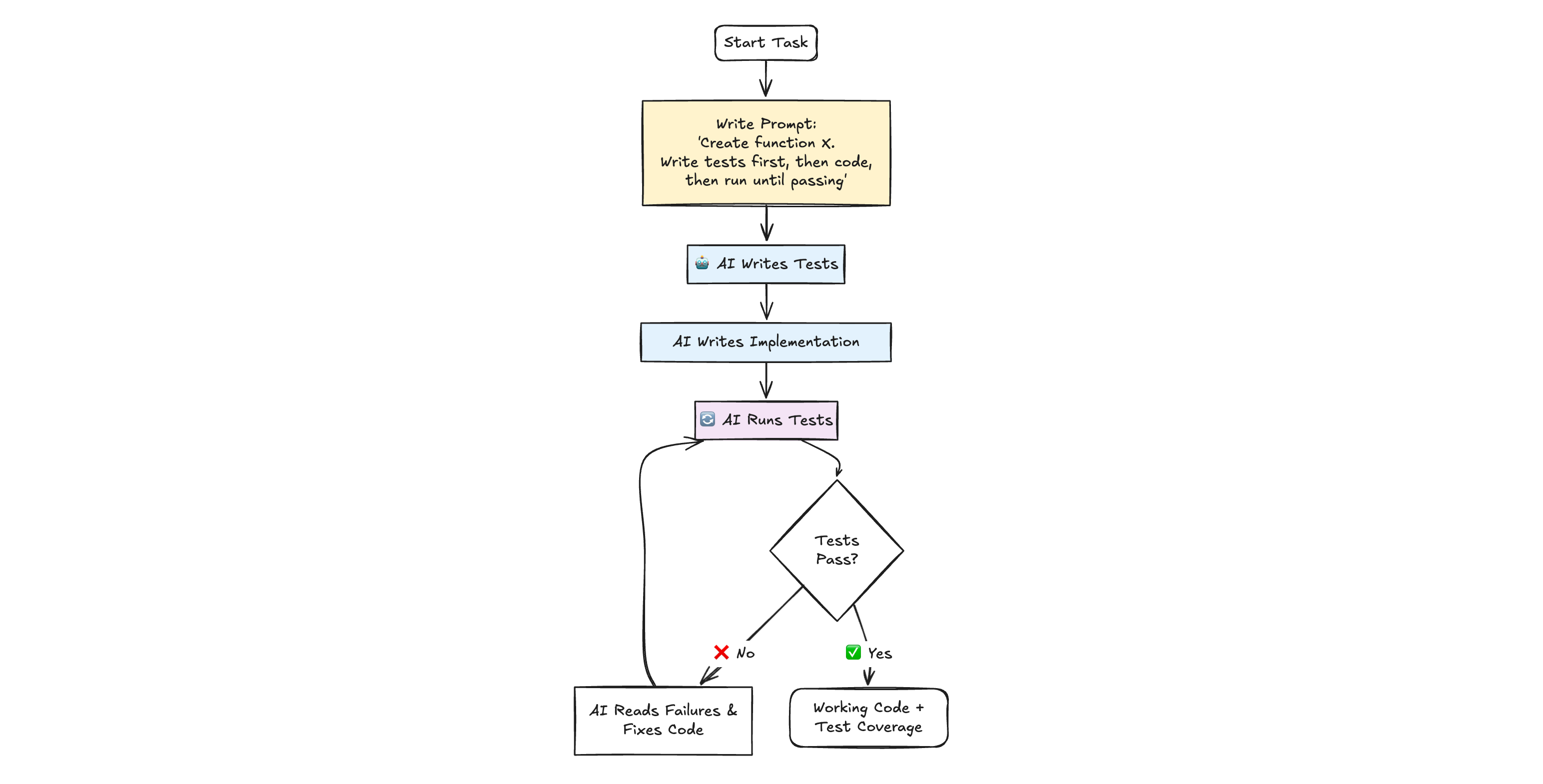
instead of generating code and then testing it, flip the sequence: have AI write tests first, then iterate on implementation until tests pass
❌ the standard prompt “Create a function that converts markdown to HTML”
✅ the dramatically better version: “Create a function that converts markdown to HTML. Write tests first, then the code, then run the tests and update the code until tests pass”
this transforms AI from code generator to autonomous problem-solver!
but why this works so effectively?
AI creates the test file automatically, writes initial implementation, runs tests, sees failures, and iterates until everything passes - all without manual intervention
You get working code with test coverage and a guarantee of correctness.
let’s see what is next on the line 👇
Context Management: The Goldilocks Principle
i’ve read some Reddit communities that revealed a counterintuitive truth: too much context kills performance as surely as too little.
“I would frequently share many materials and write detailed first prompts. The issue is this gave too much noise and allowed focus on the wrong topic.” - experienced dev on Redit
the @ symbol system provides surgical context control.
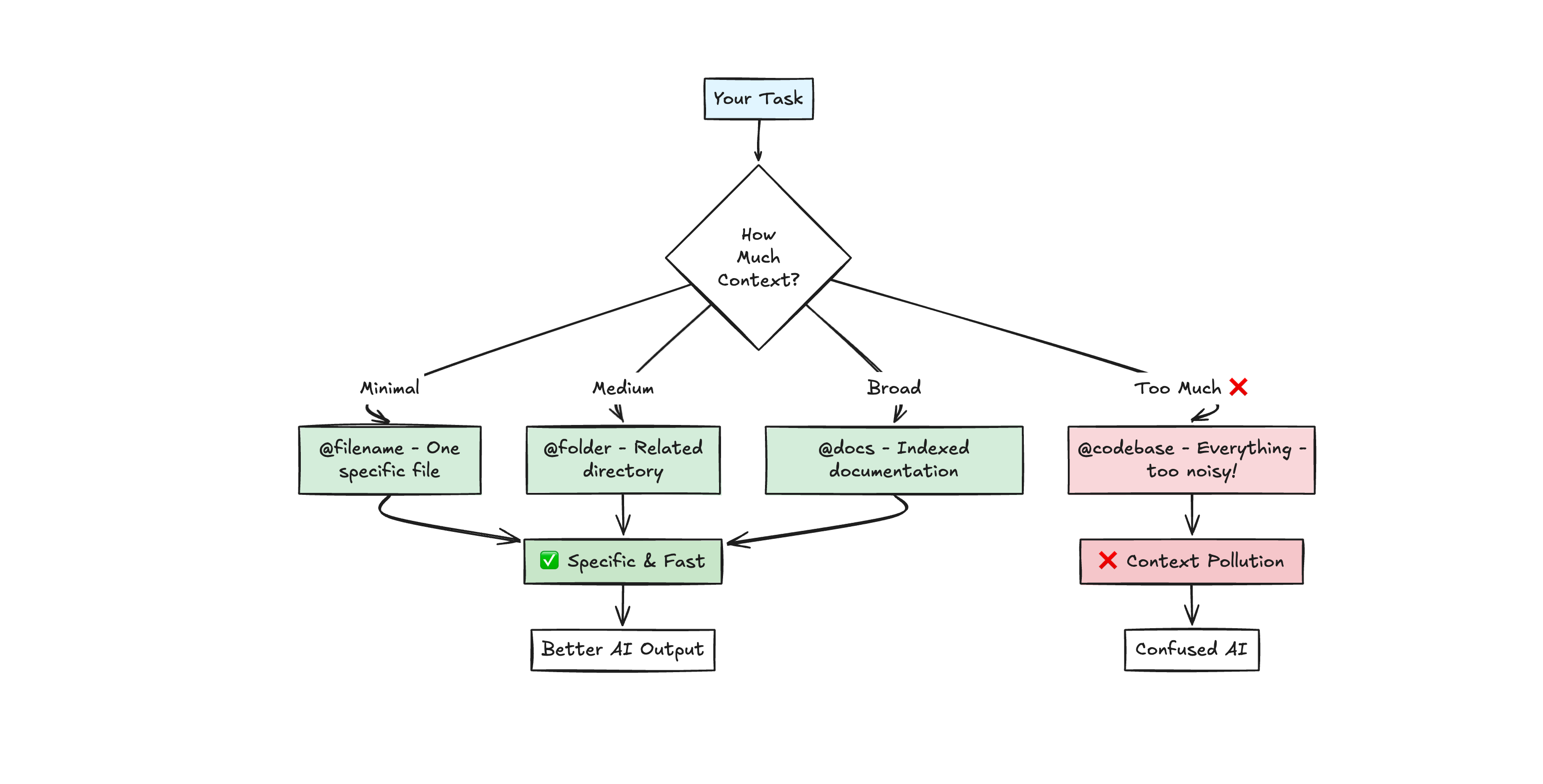
use @filename to include specific files, @folder for directories, @docs for documentation you’ve indexed, and @codebase to search your entire project (though this might be “pretty shallow”.. form my experience manual file selection works better)
the critical insight: only include files directly relevant to the current task. Broad context makes AI a generalist when you need a specialist
for Cursor specifically, the “Reference Open Editors” command (accessed via ‘/’ in the prompt) provides elegant context management.
so..
close all tabs
open only relevant files
then use the “Reference Open Editors” command to add them all to context instantly
.. this prevents the context pollution that happens when AI includes logs, terminal outputs, and unrelated files.
the practical pattern that emerged 👇
start with minimal information and add context as needed rather than overwhelming AI upfront. one file reference is often better than ten.
The 1st Prompt Determines Everything
from my experience the first conversation message serves as the anchor for everything that follows.
once incorrect assumptions creep in, recovery becomes nearly impossible.
and this explains why experienced developers start fresh chats for new tasks rather than continuing conversations.
The Bad & How To Properly Do It
the technique ‘end prompts with “Ask any questions you might have” rather than hoping AI understood.’ surfaces misalignments early..
.. better yet, use the edit button to refine prompts rather than continuing with follow-up messages, since continuing includes old context that confuses AI
Prompting Structure
the prompt structure matters enormously.
avoid politeness words like “please” and “help” for coding tasks as they trigger “helpful assistant mode” where AI prioritizes quick answers over precise instruction-following.
direct commands work better: “Create a function that...” rather than “Please help me create a function that...”
the framework that Cursor employee @ shaoruu on X shared (adopted by thousands of developers):
“DO NOT GIVE ME HIGH LEVEL SHIT. IF I ASK FOR FIX OR EXPLANATION, I WANT ACTUAL CODE OR EXPLANATION. I DON’T WANT ‘Here’s how you can...’”
it may sound funny, but this aggressive clarity dramatically improves output quality by forcing AI to provide actionable solutions immediately 😅
Common Mistakes That Destroy Productivity
we went over all of the do’s, but what about the don’ts? ..
Mistake one: continuing long conversations for unrelated tasks.
AI accumulates context across the conversation, leading to confusion and token waste
the fix: end chat after every completed task, start fresh for new work. Ask AI to update your <PROJECT_JOURNAL>.md with accomplishments before ending
Mistake two: working without a Git safety net.
every disaster story involves someone who wasn’t committing regularly
every success story involves frequent commits and branches
Anthropic’s teams emphasize: “Start from a clean git state and commit checkpoints regularly so you can easily revert if Claude goes off track.”
never let AI manage Git directly - use separate branches for AI experiments
Mistake three: Claude 3.7 Sonnet’s Overenthusiasm
I caught a lot of times where the AI has no ability to stop its chain of actions. It will attempt to solve the original prompt, then come across irrelevant code and start changing that code.. 🔁
the fix from my experience is: adding custom instructions like “Use as few lines of code as possible” and being extremely explicit: “Only edit file X, function Y. Do not modify anything else.”
there are for sure other mistakes we make, so feel free to let us know if you ca think of such 👇
Advanced techniques from power users
git worktrees system enables parallel development streams. So, create separate worktrees for each feature, let Claude work independently in isolated contexts, then merge when complete..
the logging debug loop transforms difficult bugs. Tell the AI: “Add logs to code to get visibility into what’s happening.”.. then run the code, collect logs, return to AI: “Here’s log output. What do you think is causing the issue? How do we fix it?”
..this gives AI concrete diagnostic data rather than forcing it to guess from static analysis. Multiple iterations are often needed, but can catch bugs that visual inspection miss!
Markdown context files create project knowledge bases. Maintain <PROJECT_JOURNAL>.md with running log of patterns and issues, <MILESTONES>.md for current goals and completed work, <TODO>.md for task breakdowns, and <INSTRUCTIONS>.md for project overview..
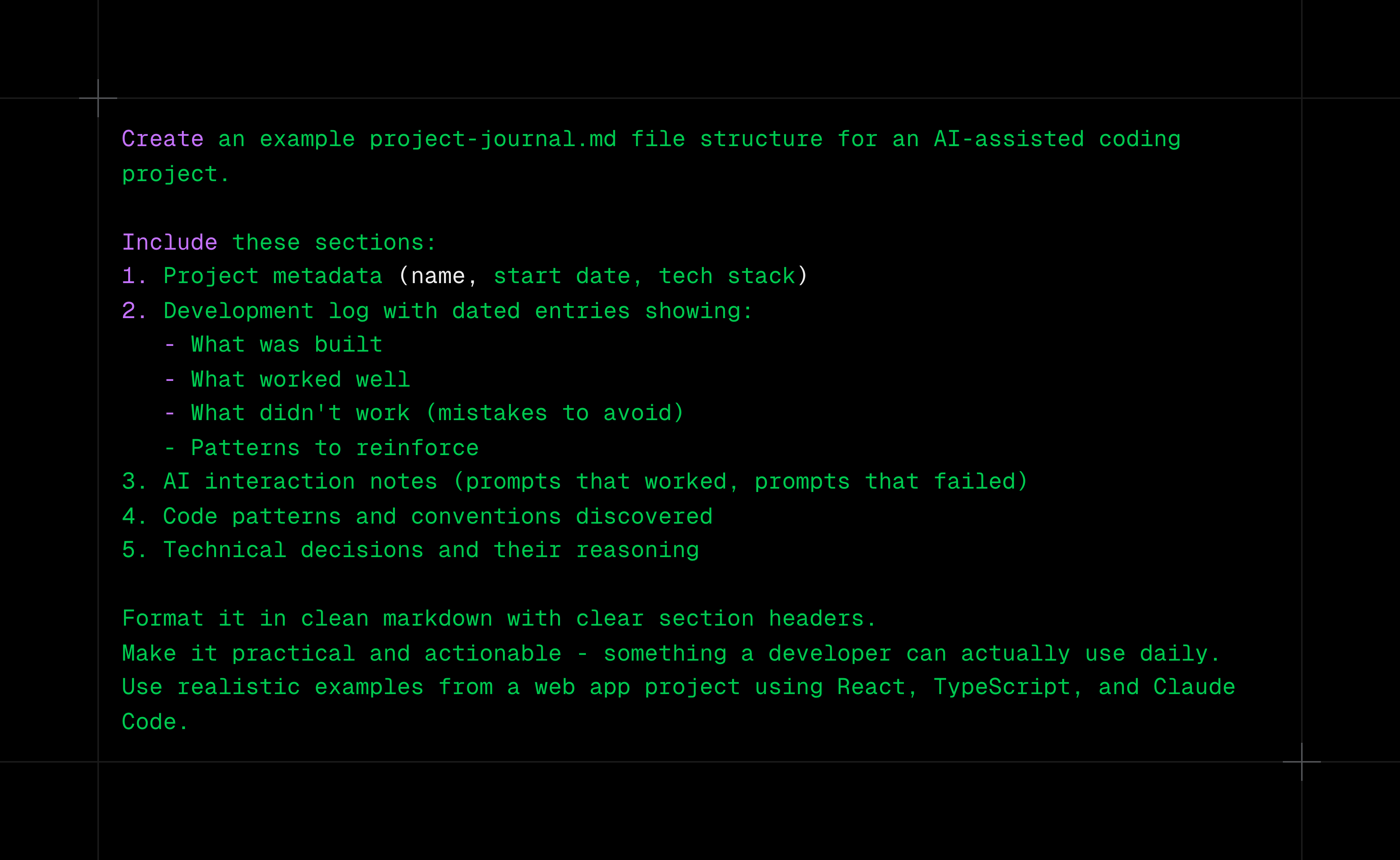
.. then reference these with @ to give AI persistent project knowledge that evolves with your codebase. After every AI edit, update the journal with patterns you don’t like and successful approaches to reinforce.
Model selection that matters
in my opinion Claude 3.5 Sonnet remains the most reliable for daily coding tasks.
it follows instructions precisely, maintains consistency, and balances speed with quality.
Claude 3.7 Sonnet and Gemini 2.5 Pro excel at complex design and multi-step reasoning but tend to over-engineer.. they need more explicit constraints
for thinking through algorithmic problems, o1-mini provides good results
Claude Sonnet 4 with extended thinking handles deep reasoning but costs more.
avoid Claude Opus in Cursor (too expensive, will hit limits immediately) and GPT-3.5 (significant quality drop). Auto mode for critical code proves unpredictable due to model switching.
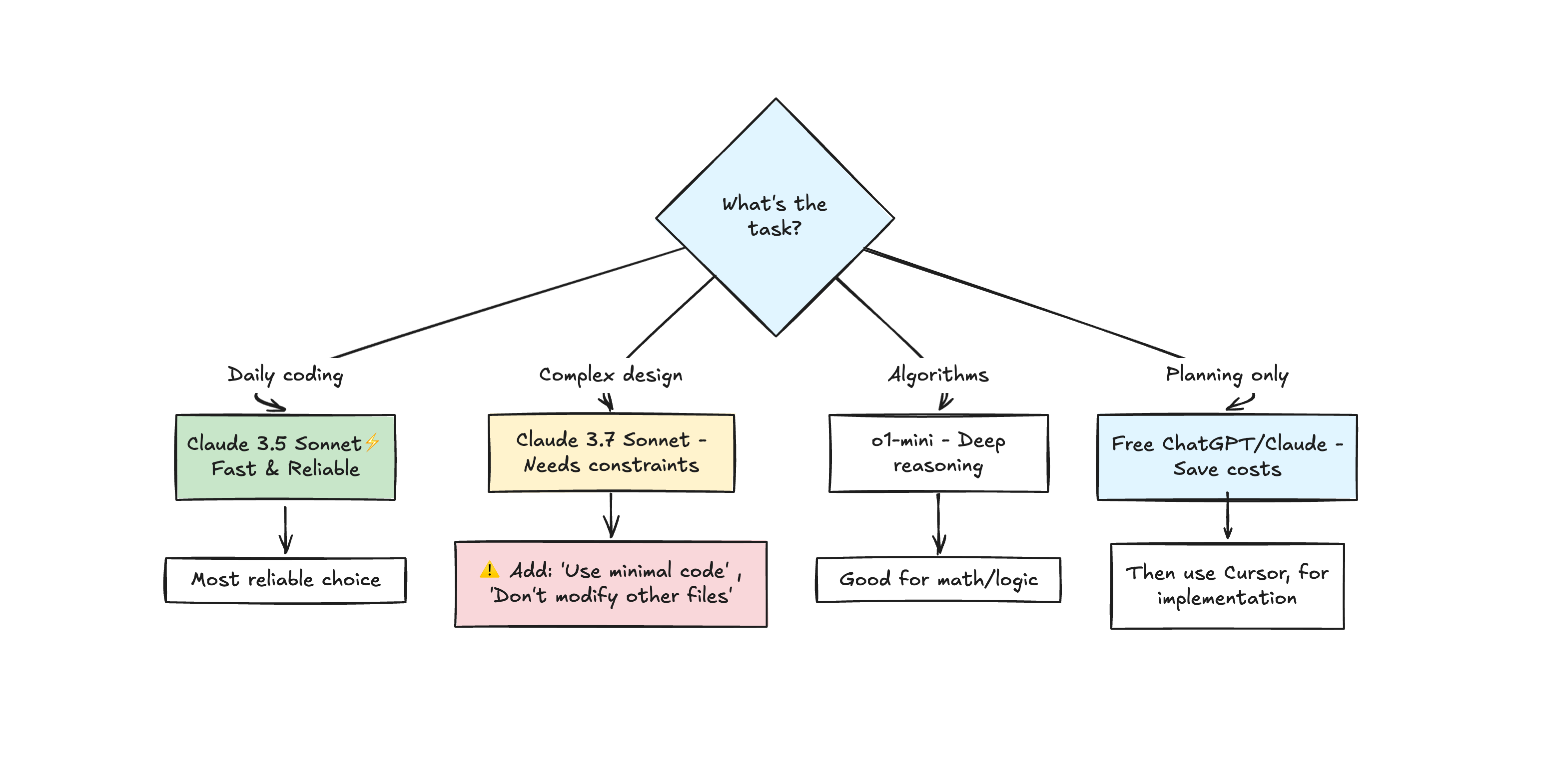
The cost efficiency pattern many developers use 💲
free Claude Code or ChatGPT for planning and architecture, then Cursor or paid APIs only for implementation.
extended thinking for complex problems requires explicit triggering. Use `Tab` to toggle thinking on/off in Claude Code, or use prompts like “think hard” or “think longer” for deeper reasoning.
the way you prompt affects thinking depth - intensifying phrases trigger more thorough analysis. Reserve this for complex architectural decisions, challenging bugs, and evaluating tradeoffs between approaches.
Integration and ecosystem
MCP (Model Context Protocol) enables Claude connections to external services like Slack, GitHub, Google Drive, and Asana.
add MCP servers to ‘.mcp.json’ file, making them available to anyone working in your codebase. We at BVNK utilize MCPs quite extensively and they are of massive help as they give that much more context to the LLMs!
Anthropic recommends MCP servers over CLI for sensitive data to maintain better security control.
one very neat feature is the the bug finder feature (Command Shift P → “bug finder”) - it compares changes to main branch and identifies potential issues. This is particularly useful before PRs - as it catches problems like missing zero value handling and unhandled edge cases. It’s a great supplementary code review to the human one 😅
The Mental Model That Works
treat AI as a highly capable junior developer requiring clear instructions, supervision, and continuous feedback.
don’t expect it to understand implicit requirements, make architectural decisions, or handle large refactors in one go.
do give it clear requirements, examples of what you want, automated tests to validate, and feedback on improvements.
as per Anthropic’s teams: the better and more detailed your prompt, the more you can trust AI to work independently
Practical Implementation Checklist
you can follow this simple checklist in your day-to-day or as a reminder when you get stuck with LLMs 🤝
Before every coding session:
1st, clean git state with recent commit
make sure CLAUDE.md or .cursorrules file exists and is current
the project structure is documented. you have clear task definition
finally - success criteria is identified
For every task:
start new chat
state goal clearly with specific constraints.
for non-trivial tasks, include “Write tests first, then implementation”
review every change line-by-line.
commit when working
When stuck:
verify AI is working on right files (add with @ )
check if you’ve been clear about what NOT to change
consider breaking into smaller tasks
try adding logging to debug
consider if fresh chat with refined prompt would work better
To improve over time:
track successful prompts
note recurring issues
update rules file regularly
share learnings with team
measure productivity changes.
refine model selection strategy
To sum it up..
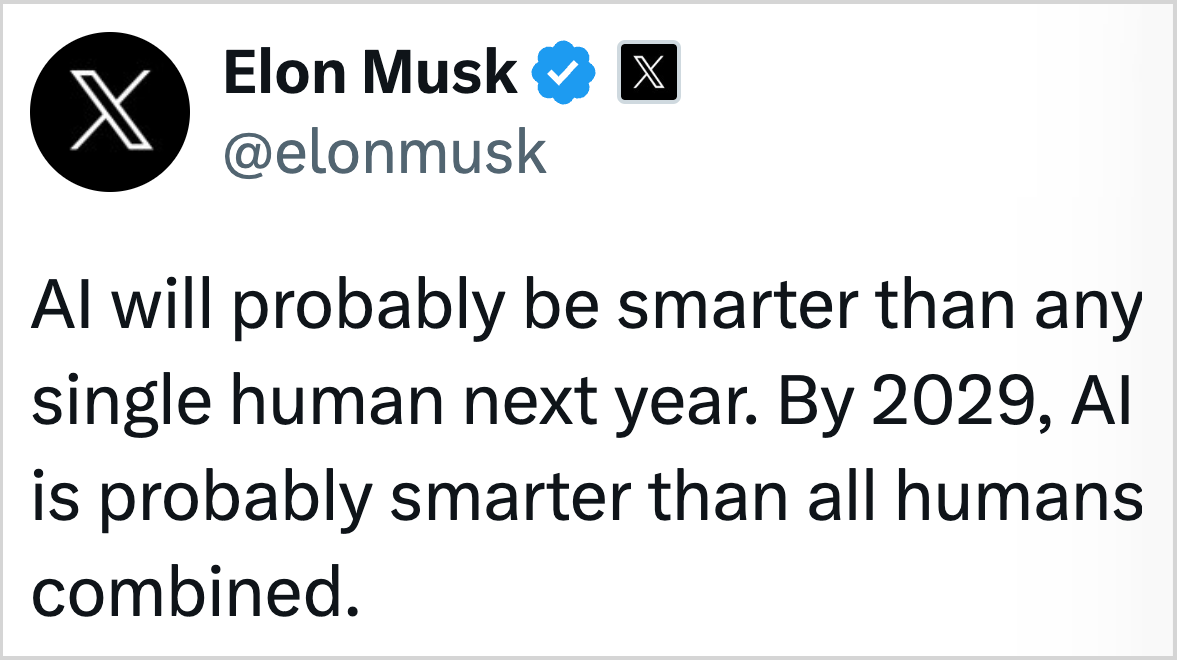
AI coding assistants amplify developer skills rather than replace them.
success requires investing time in proper workflows, establishing clear communication patterns, and maintaining critical oversight.
but for those who master these techniques, the productivity gains are transformative and sustainable.
follow me on LinkedIn Konstantin Borimechkov
and on X @ koko, where I try to post more these days 😅
thank you all for going through this blog-post and I hope it really gave you some value and food for thought next time you develop build software using AI!
let’s crush this next week! 🚀
Practical guides for AI coding tools help teams onboard faster. What's preventing your team from adopting these tools? Technical limitations or cultural resistance. More: https://thoughts.jock.pl/p/claude-code-review-real-testing-vs-zapier-make-2026